Fast Screen Recorder Review: The Lightweight Windows Tool I Now Use Daily

I've tried more screen recorders than I can count. OBS is powerful but overwhelming. Bandicam is decent but pricey. Most free tools either slap a watermark on everything or crash mid-recording. So when a follower suggested I try Fast Screen Recorder by FastPCTools, I honestly wasn't expecting much. Two weeks later, it's become my daily driver for recording tutorials and walkthroughs on my Windows PC.
What Is Fast Screen Recorder?
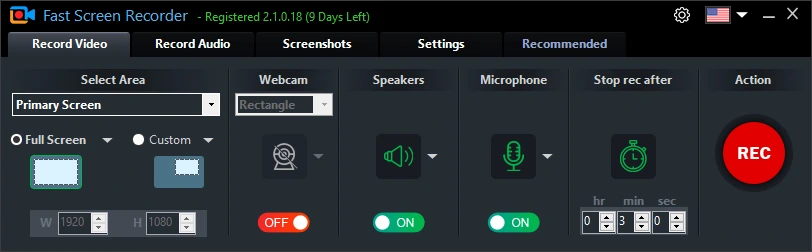
Fast Screen Recorder is a lightweight Windows desktop application by FastPCTools, a software brand trusted by over 500,000 users worldwide. It lets you record your full screen, a custom region, or multiple monitors — with system audio, microphone, or both simultaneously. The installer is only ~5 MB, and it runs cleanly on Windows 11, 10, 8.1, and 8.
Key Features I Actually Use
🖥️ Custom Area Recording
Instead of capturing the whole screen, I can draw a precise rectangle around just the application window I'm demoing. Clean, professional-looking output every time.
🎤 Dual Audio Input
Recording microphone voice and system audio at the same time — without any additional setup — was a game-changer for me. Other free tools force you to pick one or the other.
⏱️ Auto-Stop Timer
I set recordings to stop automatically after a set duration. Perfect for capturing long webinars or scheduled events when I step away from my desk.
⌨️ Hotkey Controls
Fully customizable keyboard shortcuts to start, pause, and stop recording. I never have to leave my workflow to manage the recorder.
Pros & Cons
✅ What I Love
It installs in under 30 seconds. The interface is dead simple — no learning curve whatsoever. It's digitally signed (no malware scares), lightweight enough to run in the background without affecting game or app performance, and the free trial is genuinely usable. The full version removes the watermark and unlocks unlimited recording time.
⚠️ Minor Limitations
The free version does have a watermark, which is fair for a free tool. Output is saved as MKV by default — you'll want to use Fast Video Converter (also free) to export to MP4 if needed. And it's Windows-only, so Mac users are out of luck.
Who Should Use It?
If you're a student recording online lectures, a YouTuber making tutorials, a gamer capturing highlights, or a professional doing software demos — Fast Screen Recorder is one of the most hassle-free tools available for Windows. The full version is a one-year annual license, making it very affordable compared to alternatives like Camtasia or Movavi.
Final Verdict
Fast Screen Recorder delivers exactly what it promises: fast, lightweight, reliable screen recording with audio. No bloat, no spyware, no nonsense. I've been recommending it to my audience as a solid OBS alternative for everyday recording needs.
👉 Try Fast Screen Recorder Free →
EXCLUSIVE COUPON CODE
10% OFF
WELCOME10
Get 10% off your FastPCTools annual license. Valid on Fast Screen Recorder, Video Maker, and the bundle.
Shop FastPCTools Now →Popular Blog